
Module · CRM
CRM software The customer is written once,
the quote is never lost.
Corex360 CRM (customer relationship management) is the CRM software that keeps the customer, contacts, opportunities, quotes, and contracts on one record. The relationship score and the customer lifecycle sit at the top of the card; WhatsApp, email, and calls land on the same card, and X AI reminds you of the quote that got no reply.
Last updated
What CRM is
CRM keeps the customer on one card.
Corex360 CRM (customer relationship management) is the CRM software that keeps a business's customer, contact, opportunity, quote, and contract records on one customer card, shows the relationship score and the customer lifecycle at the top of that card, and runs it on the same core as the inbox, the cloud PBX, and Corex Drive. The customer is written once; conversations, quotes, and contracts build up in the tabs of the same card.
Who it is for
- Sales teams that send and follow up quotes
- Companies where several people talk to the same customer
- Managers who want to follow open opportunities, active contracts, and open tasks from one record
- Businesses that do not want to lose the customer history when a salesperson leaves
What it does not do
- It does not decide on its own; sending the quote and approving it stay with you.
- It is not a separate product; it is a module of the Corex360 core.
Topics for the demo
- How the quote is sent to the customer.
- How contract renewal is followed up.
- The scope of the Finance tab.
- The scope of importing your existing records.
- Which records make up the relationship score.
- Which screens open in the mobile app.
Setup
Corex360 runs in two ways: in a company-specific space on Corex360 Cloud or on your own server; the choice is written into the agreement. Product demos are given live and online.
How pricing is set
No list price is published on the site; pricing comes in a written quote after the demo.
| Customer card | Contacts, representatives, tasks, opportunities, quotes, contracts, projects, finance, files, Drive, meetings, and activities as tabs of one card. |
|---|---|
| Relationship score | The relationship score and the lifecycle stage show at the top of the record. |
| Opportunity | A chat in the inbox is turned into an opportunity; the opportunity number stays on the conversation. |
| Quote | Sits in the Quotes tab of the customer card; X AI reminds you of a quote with no reply. |
| Contract management | Active contracts sit in their own box on the card; each contract's start and end dates stay on the card. |
| Conversation history | WhatsApp, Instagram, email, and calls sit on the customer card; the date of the last contact is clear. |
| Opportunity source | Whether a request came by WhatsApp, the website, phone, a referral, or a site visit is recorded on the opportunity. |
| Customer portal | The customer firm signs in to its own panel and follows its project, quotes, and conversations. |
| Customer card | Customer, contact, opportunity, quote and contract sit on one customer card. |
|---|---|
| Card tabs | The card tabs open projects, finance, files, Drive and meetings. |
| Channels | WhatsApp, Instagram and web chat link to the same card through Messaging. |
| Hosting | In a company-only space on Corex360 Cloud or on your own server; the choice is written into the contract. |
Quotes
How is quote tracking done in the CRM?
In Corex360 the quote sits in the Quotes tab of the customer card where the opportunity opened; the quote screen counts sent and accepted quotes separately. A quote takes its name from a product or service template, the amount can be in a foreign currency and the quote language can be chosen; X AI reminds you of a quote with no reply. The whole flow from preparation to follow-up is on the quote tracking software page.
Preparing the quote
A quote is named from a product or service template, and its lines take notes; quote versions are kept.
Validity, currency, and quote language
The quote list shows number, customer, amount, status, approval, date, and validity date side by side; the amount can be in a foreign currency and the quote language is selectable.
Quote follow-up
X AI reminds you of a quote with no reply; every message to the customer goes out with your approval.
Customer card
Customer tracking: what sits on the customer card?
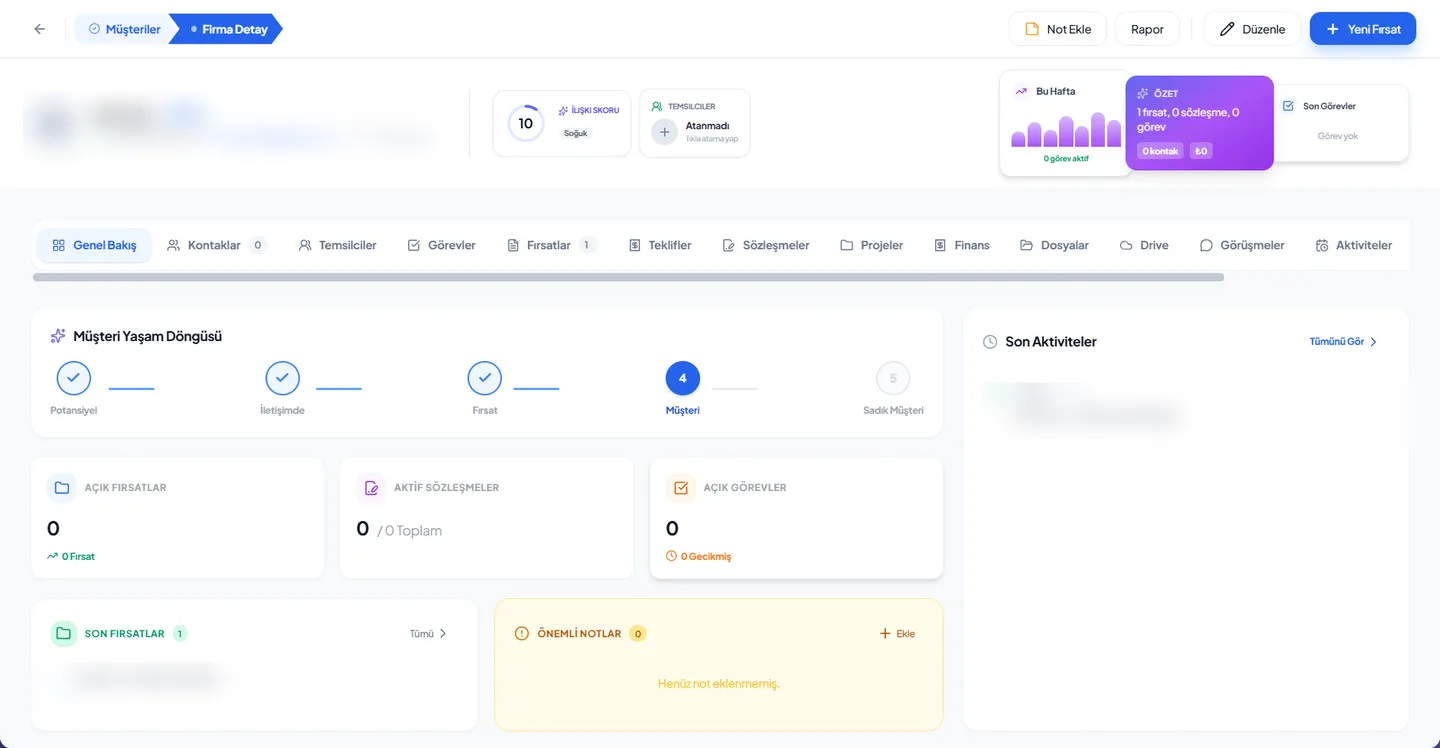
At the top of the Corex360 customer card sit the relationship score, the assigned representatives and the customer lifecycle; the tabs open the customer's whole record, from contacts to contracts and from files to meetings. The details in this section are read from the real product screens; personal data is hidden in the image. How the card is used over a working day is on the customer tracking software page.
Relationship score and representatives
The relationship score and the assigned representatives show at the top of the record, next to the This Week, Summary, and Recent Tasks panels.
Customer lifecycle
Prospect, In contact, Opportunity, Customer, and Loyal customer stages show on one line, with the record's current stage marked. See the customer lifecycle glossary entry.
Tabs
Overview, Contacts, Representatives, Tasks, Opportunities, Quotes, Contracts, Projects, Finance, Files, Drive, Meetings, Activities, Logs, and Portal Access. Which tabs get opened most depends on the industry: see the pool and spa, architecture, construction, showroom, field service, and dealer network examples on the Industries page.
Open work and recent records
Open opportunities, active contracts, and open tasks sit in separate boxes; recent opportunities, important notes, and recent activities are listed on the Overview tab.
Record actions
Add Note, Report, Edit, and New Opportunity buttons sit at the top of the record.
Customer list
Customers open in a list or kanban view; the list can be grouped and filtered by status, and each firm carries an individual or corporate badge.
Opportunities and pipeline
Opportunity tracking: how does a request reach the card from any source?
Where an opportunity came from shows on the Corex360 card: WhatsApp, website, email, phone, office visit, referral, Facebook, Instagram, site visit or web widget. The quote form on your website opens an opportunity card by itself and lands on the quote list; the card shows how long the opportunity has been waiting. The details in this section are read from the product's opportunity and quote screens.
Opportunity source
Where the opportunity came from shows on the card: WhatsApp, website, email, phone, office visit, referral, Facebook, Instagram, site visit, or web widget.
Opportunity cards from the web form
The quote form on your website opens an opportunity card on its own and lands in the quote list as a Website Quote Request; the card shows how long the opportunity has been waiting.
Sales tracking
Sales tracking: how does an opportunity become won work?
As sales tracking software, Corex360 CRM (customer relationship management) puts every opportunity on a pipeline stage and shows the ones left without follow-up separately. The pipeline opens as a kanban and counts the opportunities waiting at each stage; a quote that needs approval passes the approval step before it reaches the customer. The details in this section are read from the product's opportunity and quote screens.
Sales pipeline
The sales pipeline opens as a kanban and counts the opportunities waiting at each stage; incoming lead, quote to prepare, quote awaiting approval, won, and lost are examples of these stages.
Opportunities left without follow-up
The opportunity screen counts separately the opportunities with no reply yet, no planned activity, and hot ones without follow-up.
Quotes that go through approval
The quote list has an approval column; where approval is needed, the quote goes through an approval step before it reaches the customer.
Unanswered quotes are flagged
X AI reminds you of a quote with no reply; it does not send a quote to the customer on its own, and the decision stays with you.
Open work on the customer card
Open opportunities, active contracts, and open tasks sit in separate boxes on the customer card; where the sale is waiting is read from the record itself.
Contracts and portal
What does contract management cover in the CRM?
In Corex360, quotes and contracts sit in the Quotes and Contracts tabs of the same customer card. The contract card shows type, amount, start and end dates and who created it; contract templates are sorted into categories and progress billing runs with the contract. In the customer panel opened for a client company, the customer sees their project, quotes and conversations.
The contract card
The contract card holds the type, amount, start and end dates, and who created it; each contract is in one of the draft, in progress, active, on hold, or completed statuses.
Contract templates
Contract templates are available and sorted into template categories.
Progress billing
Progress billing runs together with the contract.
Customer portal
A customer portal opens for firms that are customers; there they see their project, quotes, and conversations and open support tickets. The card has a Portal Access tab for this.
Support tickets and activities
The CRM (customer relationship management) has a customer support tickets screen; the activity center, my tasks, meetings, appointments, notes, and the agenda sit in the same module.
Workflow
How does a price question reach a contract?
In Corex360 CRM (customer relationship management) the road from a price question to a contract runs on one card, and no step rewrites the record. The customer gets in touch by WhatsApp, email or phone and the conversation links to the card; the chat is turned into an opportunity and the quote opens in the Quotes tab. X AI reminds you of a quote with no reply; the contract, project and files build up in tabs of the same card.
- 01The conversation lands on the card
The customer reaches you by WhatsApp, email, or phone; the conversation links to the same customer card.
- 02The opportunity opens
The chat is turned into an opportunity; the opportunity number stays on the conversation.
- 03The quote is prepared
The quote opens in the Quotes tab of the customer card and stays on the same record as the customer.
- 04Follow-up and contract
X AI reminds you of a quote with no reply; the contract, project, and files sit in the tabs of the same card.
Integration
What does CRM connect to?
The channels and modules that connect to the Corex360 CRM (customer relationship management) card run on the same core. WhatsApp, Instagram and web chat arrive in one inbox and are filed on the customer card; PBX calls are made from the browser and the call history sits on the caller's card. Company email sits next to the customer record, the mobile app connects to the same core, and your existing customer and contact list is moved onto the cards.
- WhatsApp, Instagram, and web chat
Chats arrive in one inbox and are filed on the customer card. Details on the WhatsApp CRM page.
- Cloud PBX
Calls are made from the browser; the call history sits on the card of the calling number. Details on the cloud PBX page.
- Company email
Email sits next to the customer record. Channel questions are answered in the CRM, messaging, and PBX FAQ.
- Mobile app
The iOS and Android app connects to the same core.
- Your existing records
Your customer and contact list is imported into Corex360 cards.
Pages that run on this module
CRM in the working day.
The solution pages show how Corex360 CRM is used over a working day: the sales team page follows a salesperson from the morning inbox to the evening close, the manager page covers the morning briefing, and the unify channels page shows messages, calls and email landing on the same customer card. Each page shows the same card from a different desk.
Read more on this
On CRM, guides and definitions.
The ideas behind the CRM are explained on separate pages: the what is CRM post covers the concept itself, the account card and customer card post the difference from the accounting record, the CRM, messaging and PBX FAQ the channel questions, and the opportunity glossary entry what an opportunity means in the sales pipeline. These pages give the background to read before choosing a product.
What is CRM
What a sales team expects from CRM software.
BlogAccount card and customer card
How the accounting account card differs from the CRM customer card.
FAQCRM, messaging, and PBX
Short answers on channels, opportunities, quotes, and calls.
GlossaryOpportunity
The name for a request that may turn into a sale.
Let CRM speak with your own customer card.
In the demo we open your own customer and go through the quote flow together.
On the same core
Which modules does the CRM work with?
The CRM works with the other modules on the same core: WhatsApp CRM brings chats, the PBX brings call history and Email brings company mail onto the same customer card; Corex Drive keeps quote and contract files inside the card. X AI reminds you of unanswered quotes and the intelligence core reads the records coming from the channels. Cards for modules with their own page link to that page.
WhatsApp CRM
WhatsApp, Instagram, and web chats in one inbox.
Cloud PBX
Calls from the browser, call history on the customer card.
Corex Drive
Quote and contract files inside the card they belong to.
Company email next to the customer record.
X AI
Reminds you of the unanswered quote; messages to the customer wait for your approval.
Intelligence core
Reads the records coming in from the channels and brings the risk forward.
FAQ
About CRM, what people ask.
The questions a team researches when choosing CRM software, and the Corex360 CRM answers.
01What is Corex360 CRM?
Corex360 CRM is CRM software that gathers customer, contact, opportunity, quote, and contract records on one customer card, with the relationship score and the customer lifecycle at the top of the card. The general idea of CRM is covered in what is CRM.
03Do WhatsApp conversations and quote requests from our website reach the CRM?
Yes. WhatsApp, Instagram, and web chats are gathered in one inbox; messages, calls, and email meet on the same customer card. When someone asks for a quote through your site, the CRM opens a new opportunity without waiting for manual entry; the request shows under its own name in the quote list, and the route it came by is on record. The inbox is described on the WhatsApp CRM page.
05Can our existing customer list be imported?
Yes. We move your existing customer and contact records into Corex360 cards together.
07What should I check about KVKK (Turkish data protection law) when choosing a CRM?
Check where the data lives, who can access it with which role, and whether that access is logged. Corex360 runs in a company-specific space on Corex360 Cloud or on your own server; the same Corex360 Security layer runs in both, and personal data is processed under KVKK (Turkey’s personal data protection law). See On your own server and Security.
09Does Corex360 have a mobile app?
Yes. Corex360 also runs on iOS and Android; the phone app connects to the same core too. See the Mobile FAQ.
02Is there a CRM that works with Turkish e-invoicing?
In Corex360 the CRM runs on the same core as the Accounting module; the Accounting module's integration list shows e-Fatura/e-Arşiv (e-invoicing via the GİB portal of Turkey’s Revenue Administration), DIA, Logo, Mikro, Netsis and Paraşüt. Which connection is set up with your account is settled at setup.
04What does X AI do inside CRM?
X AI follows rule-bound work: it reminds you of the quote with no reply. It does not send quotes or approve contracts; the decision stays with you. Each contract's start and end dates sit on the customer card.
06Which CRM software options suit a small business in Turkey, and how do I choose one?
Small businesses in Turkey choose among many local and international CRM products; Corex360 is one of them and is built by our own team in Istanbul. When choosing, check whether WhatsApp, email and calls land on the same customer card, whether quotes and contracts sit on the same record as the customer, and whether data is kept in the cloud or on your own server.
08Can the customer see their own project and quote?
Yes. Once a firm becomes your customer, a panel opens for it in Corex360; the firm follows its own project, quotes, and conversations there and opens support tickets from it too. Access to the panel is managed from the Portal Access tab on the customer card.
10What determines the price of a CRM?
Corex360 pricing is a two-part model: a setup fee and a licence fee. One licence fee covers up to 50 users; we do not charge per user. We do not publish amounts on the site; the figure is in a written quote prepared for you after the demo call.
Sources
- Personal Data Protection Law (mevzuat.gov.tr) Last checked
Resources
Related pages
What the assistant does, what it leaves for approval and where your prompt goes.
IntegrationsSystems that connect to Corex360, each with its source.
Business templatesRoute plan, leave request form and service slip templates.
Pricing prep wizardNo figures: choose the topics to discuss in your quote.
Quote win rate calculatorWin rate by two definitions and funnel step conversion.