
Industry · Architecture practices
In a CRM for architects, what a revision rests on
stays on the job record.
Corex360 is a business application that keeps an architecture practice's proposal, contract, project files, client approvals, and drawings on one customer record. The proposal and contract sit in the card's Quotes and Contracts tabs, and drawings sit inside the record in Corex Drive. If company email is connected, X AI reads the client's approval email and files it on the card, so what a revision rests on moves from the principal's memory onto the record.
Last updated:

A Tuesday at an architecture practice · illustrative
Three jobs on the table, their records in three places.
On Tuesday afternoon there are three jobs on the table. One client is waiting for the concept design of a villa. A house's permit file has come back from the municipality with corrections. In an interior job, the client wants to move the kitchen in the construction drawings. The drawing team is small; the same two architects usually handle the municipal visits, the client presentation, and the drawing itself.
The trouble starts not in the drawing but in what the drawing rests on. The client says the kitchen revision is part of the fee proposal. The signed proposal is in an email attachment, the decisions from the presentation are in the project lead's notebook, and the client's approval is in another thread. On the server, three files sit side by side: final, final revised, and final revised approved.
In Corex360 the proposal and contract sit in the tabs of the customer card, and drawings sit inside the same record in Corex Drive. If company email is connected, X AI reads the client's approval email and files it on the card; which message came before which drawing is read from the recent activity list on the Overview.

Workflow
How does an architecture job move from the first meeting to the permit?
The stages of an architecture job depend on each other: the permit file cannot move until construction drawings exist, and those cannot start before the client approves the concept. The table shows where each stage breaks today and which Corex360 record holds it. The stages run from the first meeting and zoning information to the proposal and scope, from the presentation to concept and construction drawings, and from revision and approval to the permit and the municipality.
| Stage | In most firms today | In Corex360 | Read more |
|---|---|---|---|
| First meeting and zoning data | The zoning status and plan notes are read after the proposal is written; a promise to the client has to be taken back. | The zoning document and plan notes are added to the job record in Corex Drive; because the proposal sits in the same card's Quotes tab, the document is right next to it. | Zoning status |
| Fee proposal and scope | Survey drawings, concept, schematic, construction drawings, and permit items go out in one text file; months later nobody can find the signed version. | The accepted design proposal and the contract signed after it sit side by side in their own tabs on the same card; X AI reminds you about an unanswered proposal. | CRM module |
| Presentation and meeting | Decisions stay in a notebook or on the project lead's phone; whoever draws the revision was not in the meeting. | The summary email to the client and the reply are read by X AI and filed on the customer card if company email is connected. | Unify your channels |
| Concept and construction drawings | A delay at one stage pushes every date after it, and the client spots it before the office does. | The project opens from the Projects tab of the customer card; the proposal and contract sit beside it in their own tabs on the same card. | Project management software |
| Revision and approval | File names stand in for versions, and the wrong drawing goes to site. | The drawing sits inside its record in Corex Drive and every view and download is logged; when the client says yes by email, X AI attaches that message to their record. | Corex Drive |
| Permit and municipality | Documents filed with the municipality and the corrections that come back sit in separate folders with different people. | Documents filed with the municipality are added to the job record in Corex Drive; sharing uses a time-limited, revocable link. | Project tracking in a practice |
| The principal's morning | Did the proposal go out, has the municipality replied: these questions eat into drawing time. | X AI reports every morning and sends a summary when the day closes; the report shows in the iOS and Android app and in the browser. | A working day at an architecture practice |
Real screen
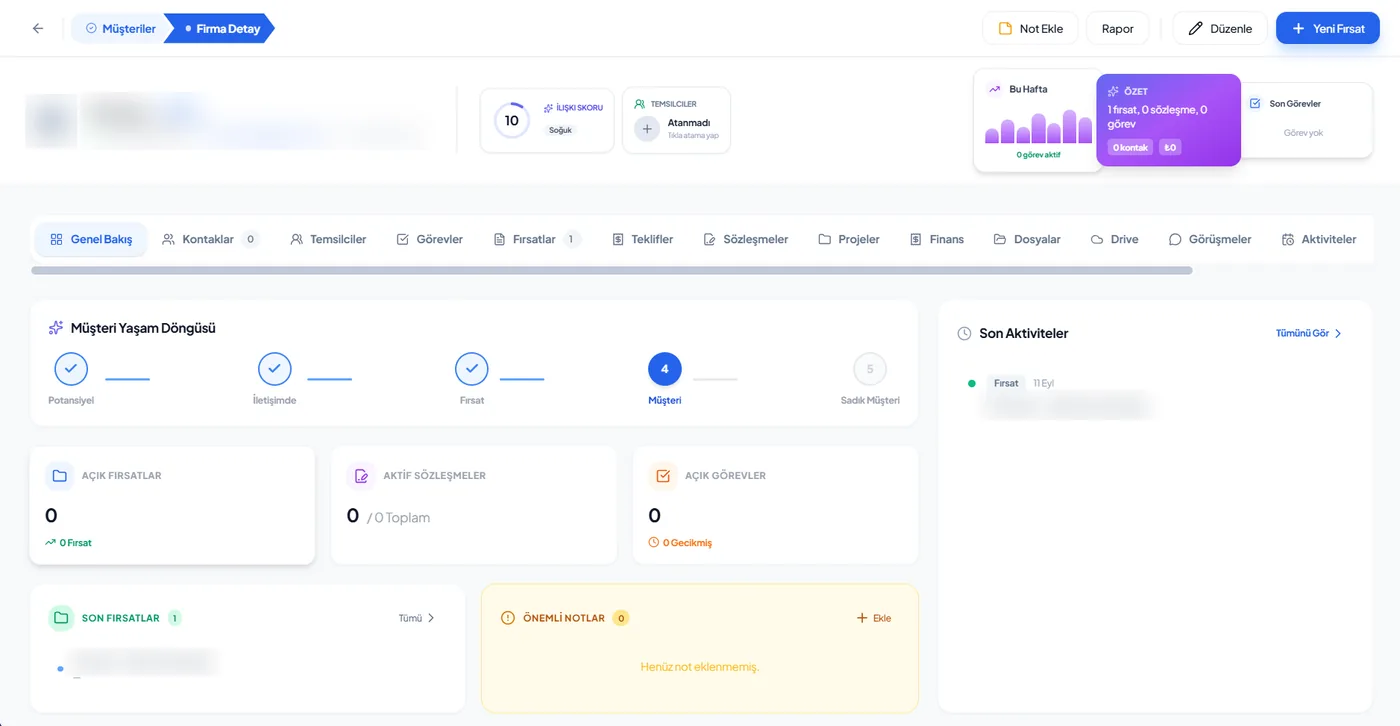
Proposal, drawing, approval in the tabs of one card.
In an architecture practice the Quotes, Contracts, Projects, and Drive tabs of the Corex360 card are read together. The client, their partner, and the contractor they appoint are separate people in the Contacts tab; each person's messages, calls, and emails build up on their own contact record, showing who was last spoken to and when. Who asked for a revision is clear from those records.
- Contacts
- Quotes
- Contracts
- Projects
- Drive
Follow-up
Who does the reminding in the practice?
In a small practice, follow-up usually lives in the principal's head. Corex360's assistant X AI follows rule-bound work, opens a task and assigns it when something slips, and never sends anything to a client on its own. For example, when a sent proposal gets no reply, a reminder is drafted and sending stays your decision; with company email connected, X AI reads the client's approval message and adds it to that client's record.
- What happened
- A proposal was sent
- What is missing
- The client said they would think about it; no reply
- In Corex360
- X AI prepares a reminder for you to read; nothing goes to the client until you send it
- What happened
- An approval email arrives from the client
- What is missing
- Company email is connected
- In Corex360
- X AI reads the incoming approval, finds the sender's customer card, and files the email there; everyone in the practice reads from that card that the concept was approved
The trade's vocabulary
Which terms does an architecture practice use?
In an architecture practice, proposal items, the permit process and daily work are written in these terms: measured survey, concept design, construction drawings, zoning status, plan note, building permit, and proposal revision. When everyone in the practice uses the same term, which stage a revision belongs to stops being a matter of debate. More on the zoning status is in the glossary.
- Measured survey
- Measuring and drawing an existing building; the starting point for renovation and restoration work.
- Concept design
- The first design stage, where massing, plan, and facade decisions go to the client for approval.
- Construction drawings
- The drawing set with the dimensions and details the building will be built to.
- Zoning status
- The document showing what can be built on a plot and how large: floor area ratio, setbacks, height. In the glossary.
- Plan note
- A provision added to the zoning plan that sets conditions specific to that area.
- Building permit
- The document in which the municipality permits construction according to the approved drawings.
- Proposal revision
- A new version of the proposal when its scope or fee changes. In the glossary.
Limits
What does Corex360 do in an architecture practice, and what is decided with you?
In an architecture practice, Corex360 keeps the proposal, contract, drawings, and approval emails on one customer record and shares drawing files through time-limited, revocable links. It does not replace your drawing software. Proposal items and the limit on included revisions, stage names and owners, where drawing files live, and which role sees which record depend on how your firm works and are decided with you.
What Corex360 does in this industry
Keeps the proposal, contract, drawings, and approval emails on one customer record.
Shares drawing files through time-limited, revocable links; every view and download is logged.
Does not replace your drawing software; the drawing file is tied to its record in Corex Drive.
Topics for the demo
Proposal items and the limit on included revisions.
Stage names and their owners.
How site supervision contract renewals are followed.
Handing a departing project lead's cards to a new owner.
Whether drawing files live on Corex360 Cloud or your own server; the choice is written into the agreement.
Which role sees which record; access is role-based.
See it with your own project.
Bring one of your proposals and its approval emails; in the demo we lay out your stages on that proposal's card.
Related pages
Where else is architecture work explained on other pages?
Proposal and project tracking in an architecture practice has its own blog post, and the owner's morning is on the manager role page. Tying drawing files to the record is covered in the document management post, and where a sent proposal gets lost in the quote tracking post; there is a hosting page for a practice that wants drawings on its own server, and a construction page for the site side.
FAQ
What architecture practices ask us.
What is a CRM for architecture practices?
For architecture practices, a CRM (customer relationship management) is software that keeps a job's enquiry, proposal, revisions, contract, and project files on the same customer record. The hard part of this work is holding the scope as much as finding the client: every extra request means a new drawing and a new amount. A CRM keeps it findable, months later, which revision rests on which proposal.
How do architecture practices use Corex360?
The proposal and contract sit in the Quotes and Contracts tabs of the customer card, the project in the Projects tab, and drawings inside the same record in Corex Drive. If company email is connected, the client's approval email is read by X AI and filed on the card. Nobody has to call the principal to ask where a job stands; the answer is on a record the team can open.
How should architecture practices choose a CRM?
Look at how it follows revisions: do the first proposal, the revised proposal, and the correspondence that changed the scope sit on the same record? Ask who opens the drawing files, with which permission, and whether a share link can be withdrawn. If you work with overseas clients: in Corex360 a quote amount can be written in a foreign currency and the quote language can be chosen.
Where is the zoning certificate opened while a proposal is written?
The zoning status document and plan notes are added to the job record in Corex Drive; because the proposal is prepared on the same customer card, the two are read side by side. When setbacks come up in the concept design, when the permit file is prepared, or when the client asks about an extra floor, the same document is opened from the record instead of being searched for again. The term itself is in the glossary.
How do we tell whether a revision is covered by the proposal?
The signed proposal and contract sit in the Quotes and Contracts tabs of the customer card. If the scope items and the limit on included revisions are written in the proposal, the answer is read from the card. The email that asked for the revision is filed on the same card by X AI, so the discussion rests on the record rather than on memory.
Where are our drawing files kept?
Drawings are kept inside the record they belong to in Corex Drive; sharing uses time-limited, revocable links, and every view and download is logged. You choose the hosting: a company-specific space on Corex360 Cloud or your own server. The same Corex360 Security layer runs in both; details are on the Security page.
What happens to the jobs if a project lead leaves?
The proposal, contract, approval emails, and drawings sit on the customer card and in Corex Drive, which means they stay with the practice rather than on someone's phone or in their inbox. Handing the cards to a new owner is on the topics for the demo list.
Where should a small practice start with Corex360?
For most practices the first step is proposal follow-up: X AI reminds you about an unanswered proposal, and the message to the client goes out only with your approval. Next, drawing files move into Corex Drive and approval emails onto the customer card.
How does Corex360 know architecture?
Savaş Grup has its roots in architecture and also grew in construction and pools. The group's architecture practice runs presentations, proposals, contracts, projects, and client follow-up in Corex360, which was set up to gather the scattered records of the group companies. Our brand's cut-through drawing also traces back to the group's architecture work: an architect cuts a building to understand it, and business intelligence cuts a company. The story is on the About page.
Other industries
Working in another industry?
Corex360 industry pages show how the same customer card fills up in different trades: pool and spa, architecture practice, construction, showroom and store, technical service and maintenance, manufacturer and dealer network. Each page gives that trade's stages, where work most often breaks, the follow-up rules and the trade's own terms in the same order; the core is the same in every industry.