
Module · Messaging
WhatsApp CRM Wherever the customer writes from,
the conversation is in one inbox.
Corex360 Messaging is the WhatsApp CRM (customer relationship management) module that gathers WhatsApp, Instagram, and web chats in the team's shared inbox. Every conversation is filed on the customer card, gets an owner, and when turned into an opportunity carries the opportunity number as a badge.
Last updated
What WhatsApp CRM is
Messaging keeps the conversation on the customer card.
Corex360 Messaging is the WhatsApp CRM (customer relationship management) module that gathers a business's WhatsApp, Instagram, and web chats in one shared inbox, files each conversation on the customer card, and turns the chat into an opportunity. Messages, calls, and email meet on the same customer card. Each conversation is assigned an owner; a chat turned into an opportunity carries the opportunity number as a badge.
Who it is for
- Sales teams that get price questions on WhatsApp
- Businesses where several people answer the same number
- Businesses that get catalog requests on Instagram
- Managers who do not want to lose the customer history when a salesperson leaves
What it does not do
- It does not send replies to customers on its own; X AI prepares a draft and sending happens with your approval.
- It does not leave the conversation on a personal phone; the chat stays in the company record.
- It is not a separate product; it is a module of the Corex360 core.
What this page does not promise
The WhatsApp account type, bulk messaging, campaign sends, and an auto-reply bot are not among the things promised for the Messaging module.
Topics for the demo
- The WhatsApp account type.
- The scope of bulk messaging, campaign sends, and an auto-reply bot.
- Which information the Messaging screen shows in the mobile app.
Setup
Corex360 runs in two ways: in a company-specific space on Corex360 Cloud or on your own server; the choice is written into the agreement. Product demos are given live and online.
How pricing is set
No list price is published on the site; pricing comes in a written quote after the demo.
| Shared inbox | WhatsApp, Instagram, and web chats in one inbox; every conversation links to the customer card. |
|---|---|
| Channel strip | The channel is picked from the strip on the left of the window, which also has a reports view. |
| One customer card | Messages, calls, and email meet on the same customer card; the last contact is clear. |
| Assignment | The Assigned to me filter separates each owner's list; every conversation has an owner. |
| Into an opportunity | A chat is turned into an opportunity; the conversation carries the opportunity number as a badge. |
| Social media | Post planning and scheduling, Facebook and Instagram account linking, and Instagram DMs sit in the same module's social media section. |
| Mobile | Corex360 has iOS and Android apps tied to the same core. |
| Inbox | Conversations from WhatsApp, Instagram and web chat are gathered in one inbox. |
|---|---|
| Where the chat is kept | The conversation is kept on the customer card, not on the salesperson's phone. |
| WhatsApp line | The line connects to Corex360 as a channel. |
| Hosting | In a company-only space on Corex360 Cloud or on your own server; the choice is written into the contract. |
Shared inbox
What does a shared inbox give the team?
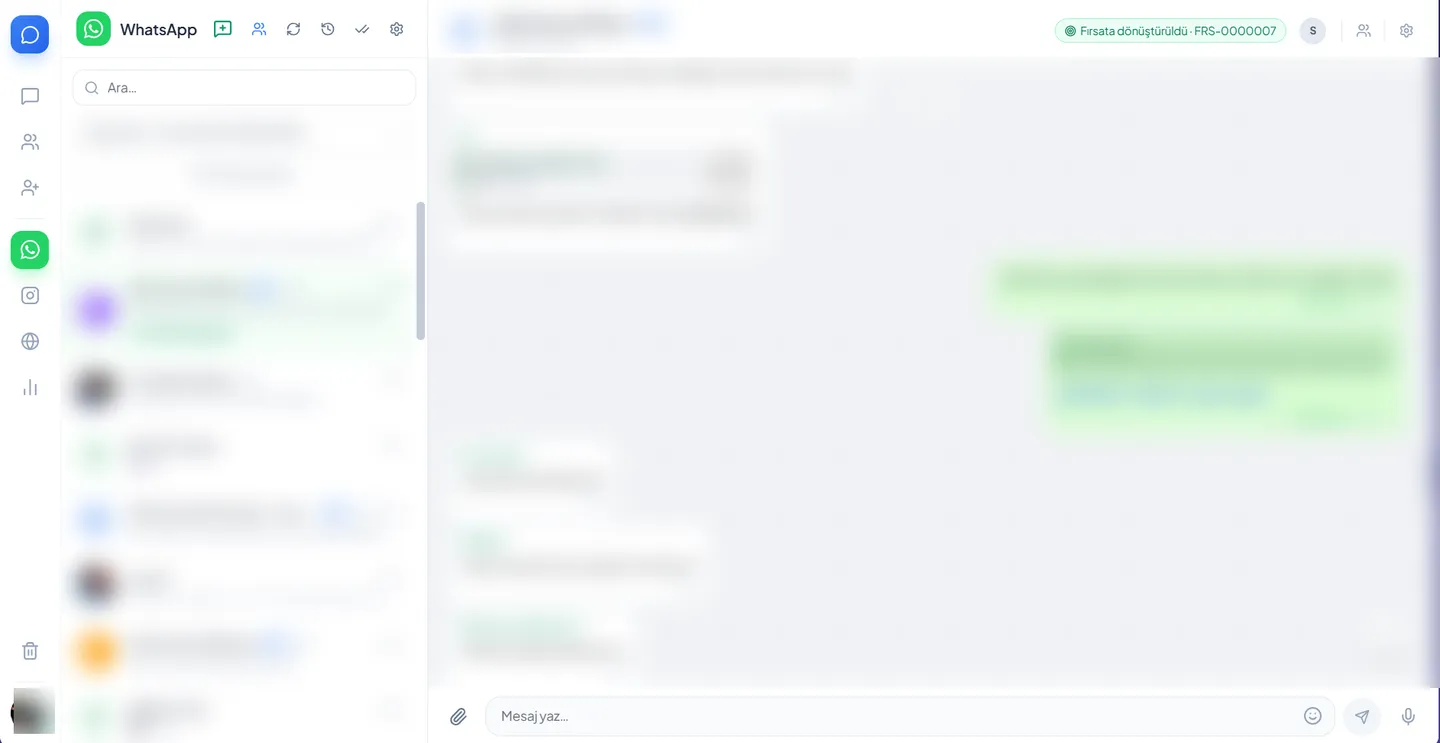
In the Corex360 Messaging shared inbox the team shares the messages coming to one account in a single list, and every conversation has an owner. WhatsApp, Instagram and web chat are chosen from the channel strip on the left; above the list sit a search box, a line selector and the Assigned to me filter that separates everyone's own list. The details in this section are read from the real Messaging window; personal data is hidden in the image.
Channel strip
WhatsApp, Instagram, and web chat are picked from the strip on the left of the window, which also has a reports view.
Search, line picker, Assigned to me
Above the conversation list sit a search box and a line picker; the Assigned to me filter separates everyone's own list.
Group chats
Group chats are marked with a Group label in the list, so they do not mix with one-to-one chats.
A team on one number
Every conversation has an owner, and the team shares the messages sent to the account in one list. See the shared inbox glossary entry; the day of the customer service team running that list is explained on its own page.
Groups and archive
In the Communication menu, Groups and Archive screens sit next to Messaging.
Channels
How do WhatsApp and Instagram DMs reach the customer card?
Chats are gathered on the Corex360 customer card whichever channel they come from. Because the WhatsApp conversation sits on the card, its history is open to whoever takes over; a catalogue request or price question from Instagram lands on the card and is assigned an owner, and site chat comes to the same inbox. Once a chat is turned into an opportunity, the opportunity number shows on the chat as a badge. You can see the card itself on the CRM (customer relationship management) page.
WhatsApp chats
Because the WhatsApp chat lives on the customer card, its history is open to whoever takes over. Bringing channels together is covered in the omnichannel communication glossary entry.
Instagram DM handling
Instagram is picked from the channel strip; catalog requests and price questions land on the customer card and are assigned to an owner.
Web chat
Chat from your website arrives in the same inbox; the conversation is filed on the relevant customer card.
Turning a chat into an opportunity
A chat is turned into an opportunity and then shows in the list and its header with a badge carrying the opportunity number.
Writing a reply
The compose area has attachment, emoji, and voice message buttons; a reply can quote a message and mention people by name.
Search and forwarding in a chat
Inside a chat you search the messages, and media and files show in a separate list; a message can be forwarded, and a voice message is recorded straight into the conversation.
Social media
What does social media management cover in Messaging?
Alongside chats, the Messaging module has a social media management section. Posts are planned and scheduled for publishing there; Facebook and Instagram accounts are connected to Corex360 from the same section, and the Instagram DM screen also sits inside social media management. The details in this section are read from the product menu.
Planning and scheduling posts
Posts are planned in this section and scheduled for publishing.
Account linking
Facebook and Instagram accounts are linked to Corex360 from this section.
Instagram DMs
An Instagram DM screen also sits inside social media management.
Workflow
How does a first message become an opportunity?
In Corex360 Messaging the road from the first message to an opportunity runs in one inbox, and at no step does the conversation stay on a phone. WhatsApp, Instagram and web chat sit as separate channels on the channel strip; the conversation is filed on the customer card and assigned an owner. Once the chat becomes an opportunity it carries its number; if a quote gets no reply, X AI reminds you.
- 01A channel is picked
WhatsApp, Instagram, and web chat sit as separate channels in the channel strip.
- 02The conversation lands on the card
The conversation is filed on the customer card.
- 03An owner is assigned
The conversation is assigned to an owner.
- 04The opportunity opens
The chat is turned into an opportunity and carries its number; if a quote gets no reply, X AI reminds you.
Integration
What does Messaging connect to?
Corex360 Messaging connects to channels and records on the same core. WhatsApp conversations gather in their own channel in the Messaging window, and Instagram and web chat are chosen from the channel strip and land in the same inbox. Company email and PBX calls sit on the same core and meet on the same customer card; every conversation is filed on the customer card. The list includes only connections described on the product pages.
- WhatsApp
WhatsApp chats gather in their own channel in the Messaging window.
- Instagram and web chat
Both are picked from the channel strip and land in the same inbox.
- Email and cloud PBX
Company email and PBX calls sit on the same core and meet on the same customer card. The cloud PBX page shows the call side.
- CRM customer card
Every conversation is filed on the customer card. Details on the CRM (customer relationship management) software page.
Pages that run on this module
How is Messaging used over a working day?
The solution pages show how Corex360 Messaging is used over a working day: the unify channels page shows messages, calls and email landing on the same customer card, the sales team page follows a salesperson from the inbox to the close, and the hand it to the assistant page shows X AI reminding you of an unanswered quote.
Unify the channels
Messages, calls, and email meet on the same customer card.
RoleSales team
Every conversation on the card, every price question an opportunity: the sales team day.
NeedHand the process to the assistant
X AI reminds you of an unanswered quote; drafting and sending happen with your approval.
Read more on this
On WhatsApp CRM, guides and definitions.
The ideas behind WhatsApp CRM are explained on separate pages: the CRM, messaging and PBX FAQ covers channel connection questions, the omnichannel communication entry explains channels meeting in one place, and the shared inbox entry explains what it means for a team to look at one list. These pages give the background to read before choosing a WhatsApp CRM.
Try it with your own chats.
We build the demo with your channels and your customer card.
On the same core
Which modules does Messaging work with?
Messaging works with the other modules on the same core: the customer card the conversation lands on carries the opportunity, quote and contract in the CRM; the PBX writes the history of calls made from the browser, and Email the history of company mail, to the same card. X AI reminds you about quote follow-up, the mobile app opens the same core on the phone, and Corex360 Security keeps every message on record.
CRM
The customer card the conversation lands on; opportunity, quote, contract.
Cloud PBX
Calls from the browser, call history on the same card.
Company email next to the customer record.
X AI
Reminds you about quote follow-up; a draft goes out with your approval.
Mobile app
The same core on the phone: iOS and Android.
Corex360 Security
Every message on record, role-based access.
FAQ
About WhatsApp CRM, what people ask.
The questions a team researches when looking for a WhatsApp CRM and a shared inbox, and the Corex360 answers.
01What is a WhatsApp CRM?
A WhatsApp CRM is software that connects WhatsApp conversations to the customer record, so the conversation lives in the company record. Corex360 Messaging gathers WhatsApp, Instagram, and web chats in a shared inbox and files each conversation on the right customer card.
03Do messages, calls, and email show on the same customer?
Yes. In Corex360, messages, calls, and email meet on the same customer card, and the last contact date is read from the card. Unify the channels follows one customer across three channels in a day.
05How are group chats kept apart from one-to-one chats?
In Corex360 Messaging, group chats carry a Group label in the list, so they do not mix with one-to-one chats.
07How do I connect WhatsApp to a CRM, and which tools do it?
Your WhatsApp Business line connects to Corex360 as a channel through Meta's official cloud API (WhatsApp Cloud API) with authorized staff set for each line. Conversations from the line show in their own channel in the Messaging window and are assigned to an owner. On the WhatsApp Business Platform, Meta sets message pricing, the 24-hour customer service window and template message rules; the current rules are in the Meta developer documentation. Who bills those fees is settled at setup.
09What should you look at when choosing a WhatsApp CRM?
Check whether the conversation lives in the company record, whether several people can answer the same number, whether each chat lands on the right customer card, and whether a price question becomes an opportunity. In Corex360 Messaging the conversation sits on the card, the assignment in the list, and the opportunity number on the conversation's badge.
02What is a shared inbox for?
A shared inbox lets the team see the messages sent to the same number and account in one list. In Corex360 every conversation is assigned to an owner, and each person pulls out their own conversations with the Assigned to me filter.
04How does a chat become an opportunity?
In the Messages window a chat is turned into an opportunity. The converted conversation then shows in the list and its header with a badge carrying the opportunity number; the opportunity opens on the same customer card.
06Does X AI reply to customers on its own?
No. X AI never replies to customers or sends quotes on its own; it drafts, and sending waits for your approval. It reminds you of an unanswered quote but leaves the decision to you. For the draft and approval flow, see Hand the process to the assistant.
08Can Instagram posts be planned from Corex360 too?
Yes. Social media management lives in the same module as Messaging: you link your Facebook and Instagram account, prepare a post, and schedule it for its publishing time; the Instagram DM screen is there as well.
10Where are messages kept, and who sees them?
Messages are kept in the Corex360 core, on the customer card, on Corex360 Cloud or on your own server. Access is role-based and logged; personal data is processed under KVKK, Turkey's data protection law. Access and storage principles are gathered on the Security page.
Related questions
- Do you need consent to send a campaign message on WhatsApp?
- The consent rule follows the type of message. The Regulation defines a commercial electronic message as one sent by means such as telephone, text and email; WhatsApp is not named, and the list is illustrative. For a message with a campaign in it, checking for the recipient's consent in İYS is the safe course. This page is not legal advice.
Resources
Related pages
Systems that connect to Corex360, each with its source.
X AIWhat the assistant does, what it leaves for approval and where your prompt goes.
Pricing prep wizardNo figures: choose the topics to discuss in your quote.
Business templatesRoute plan, leave request form and service slip templates.