

CRM is software that keeps a company's relationship with its customers on one record: who wrote, what they asked for, which quote went out, and whether a reply came back. The name is short for customer relationship management. The real test of the definition is an SME sales team's day: from the price question in the morning to the contract signed in the evening, what the team really expects from CRM, and what it should not.
01.What exactly does CRM record?
CRM records the customer, the people you talk to there, the opportunities opened, the quotes sent, and the contracts signed, all on the same card.
The heart of a CRM is the customer card. The company details sit at the top, and the people you deal with there sit underneath. The purchasing manager is one person and the contact in accounts is another; both belong to the same company, and you reach both from the same card.
Over time a story builds up inside the card: the first message, the price question, the quote sent, the revision, the signed contract. CRM keeps that story in date order. When the salesperson or the manager opens the card, both see the same sequence, and nobody scrolls through a phone asking 'what did we last discuss with this customer'.
The card also has a task side. The moment you tell a customer 'I will get back to you on Thursday', that promise is written on the card as a task and tied to an owner. So CRM keeps the promises made alongside the history, and a customer's trust is usually built on those promises being kept.
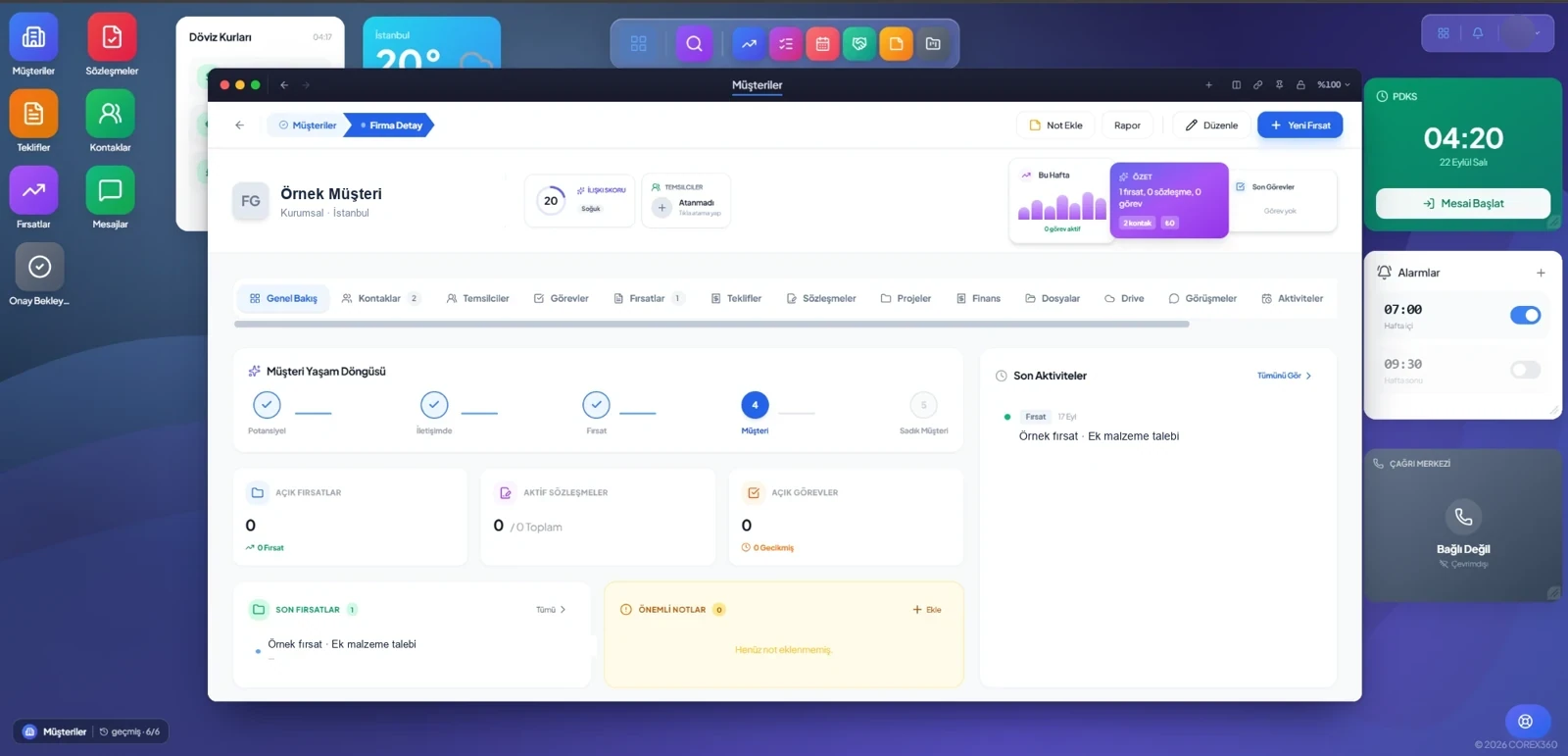
In Corex360 this card sits on the real screen as tabs: Overview, Contacts, Tasks, Opportunities, Quotes, Contracts, Projects, Finance, Files, and Drive. You can see how the card works, on the real screen, on the Corex360 CRM software page.
02.What does an SME sales team expect from CRM?
Before anything else, an SME sales team expects CRM to make sure no customer and no quote gets lost between two people.
Example scenario: Picture a team in Istanbul selling commercial kitchen equipment. In the morning a restaurant asks the price of an oven on WhatsApp, at noon a hotel emails for a revision to its quote, and late in the afternoon an old customer calls the switchboard about service. The team is small, everyone runs to every job, and by evening who promised what lives in a notebook or in someone's head.
Before charts or impressive reports, a team like this wants something plainer: to see what was promised to whom today. Who needs a call back, which quote has no reply, which contract renewal is coming up. That list should live in the record, not in someone's head.
- Whatever channel the customer writes from, it lands on the same card.
- The price question is not forgotten; it opens as an opportunity.
- The quote is prepared on the card, so nobody argues about which version is the latest.
- Someone reminds you of the quote that got no reply.
- When a salesperson goes on leave or leaves, the customer is not left hanging.
None of these expectations asks for a new habit. The team already writes on WhatsApp, already sends quotes, already calls customers. CRM leaves those habits alone and gathers their traces on the same card. A CRM that adds a new burden to the team is soon abandoned; one that keeps track of the work already being done gets used without being pushed.
03.Why can an Excel list not stand in for the customer record?
An Excel list is a snapshot of one moment; it does not keep, by itself, who changed what, which conversation took place, or what comes next.
Most teams start their customer list in Excel. One row per customer, with columns for phone, last contact, and notes. For the first few months it works. Then the copies multiply: one on the desktop, one in a shared folder, one in a salesperson's email. Nobody knows which one is current. Excel cannot tell you who changed what, cannot remind you, and cannot link a WhatsApp conversation to a row. In CRM there is one record; every change carries the name of the person who made it, pending work shows on the card as a task, and it comes to you when it is due.
The difference is clearest in a showroom. A customer walks in and says 'we spoke to you last month'. In Excel that conversation does not exist. In CRM the salesperson opens the card, sees the conversation, the quote that went out, and the customer's objection to the price on one screen, and picks the talk up where it stopped.
Excel still has its place: it is useful for exporting a report and studying it. Which teams can stay with the spreadsheet, and after which events it turns into a risk, is weighed criterion by criterion in the Excel or CRM decision.
04.What does CRM not do?
CRM manages the customer relationship; issuing invoices, counting stock, or making decisions for you is not its job.
Expecting everything from a CRM is a quick way to make it unusable. Stock, purchasing, and invoicing are the company's internal resources; they are managed on the ERP and accounting side. We covered this split in detail in the CRM vs ERP difference article. In Corex360 the customer card has a Finance tab. The difference is that both sides run on the same core: the customer is not typed into two programs, and sales and accounting look at the same company from the same card.
CRM does not make decisions either. Sending the quote, approving the contract, and accepting a discount belong to the salesperson and the manager. The software's job is to put every piece of information you need in front of you at the moment of decision.
| Record | Whose job | Where it is kept |
|---|---|---|
| Customers and contacts | CRM | Customer card |
| Price question and opportunity | CRM | Opportunity record |
| Quote and contract | CRM | Quote and contract records tied to the customer |
| Invoices and collections | Accounting | Customer account |
| Stock and purchasing | ERP | Stock card and purchase record |
| Staff, leave, and payroll | Human resources | Staff record |
05.What does an assistant change in CRM?
An assistant reads the record, reminds you of follow-ups by the rule you write, and prepares the report; it leaves the decision to you.
The weak spot of a classic CRM is that data entry is left to the salesperson. On a busy day the card does not get updated, the record goes stale, the list stops being trusted, and the team goes back to the notebook. In Corex360, X AI closes that gap. It reads the email that comes in from a customer and files it on the right card, and reminds you of the quote left unanswered. The contract's start and end dates sit on the contract card. It lists what is pending in the morning report and sums up what was done in the evening summary.
Its limit is clear too. X AI stops and asks when a decision involves money, a contract, or people. X AI follows rule-bound work, and when a rule breaks it opens a task and assigns an owner.
06.Where do you start with CRM?
You start CRM where you lose the most; for most SMEs that is the unanswered price question and the quote nobody followed up.
Do not try to move every process on the same day. First gather the customer list and the conversations onto the card. Then move quoting onto the card. Contracts, projects, and finance come last; by then the team is already opening the card every day. During Corex360 setup your existing customer and contact records are moved together.
There is a simple way to tell the start has taken hold. After a few days, ask the team 'which quote has no reply'. If the answer comes from the screen rather than from memory, CRM has started to work.
At the start, everyone also needs to fill in the same fields the same way. How the company name is written, at which stage an opportunity is opened, which reasons a lost quote can be closed with. If these small rules are agreed from day one, the record stays clean and later reports make sense on their own.
07.What does the customer record hold in Corex360 CRM?
Corex360 CRM keeps customers, contacts, opportunities, quotes and contracts on one record, with the lifecycle stage and relationship score at the top.
The lifecycle stages are Prospect, In contact, Opportunity, Customer and Loyal customer, and the record's current stage is marked. Where the opportunity came from is kept on the record: WhatsApp, the website, email, phone, an office visit or a referral. The sales pipeline opens as a kanban and shows a count for each stage. In the Savaş Grup companies the work runs on this record too: a quote goes out, the sale is approved, and it becomes a contract and a project.
Sources
How was this page prepared?
- Written by: Şevket Erer, Co-founder, AI Specialist
- Sources: official body, standard, and vendor information is taken from the primary sources in the Sources list on this page; each source shows the date it was last checked.
- Product information: sentences about Corex360 rest on the company's product fact records; unconfirmed features are not written.
- Use of AI: the Corex360 team writes the text; AI tools are used for drafting and translation. Publishing principles
- Dates: first published , last updated . Corrections policy
Frequently asked
01What is CRM?
CRM is software that keeps a company's customers, the people it talks to at those companies, opportunities, quotes, and contracts on one record.
02What does CRM stand for?
CRM is short for customer relationship management. In Turkish it is used as 'müşteri ilişkileri yönetimi'.
03Does a small team need CRM?
Even a small team needs CRM if more than one person talks to customers and quotes are scattered between email and phones. In a small team, one person's leave can be enough to stop the follow-up.
04What should be ready before starting with CRM?
Your current customer and contact list, the quote template you use, and who on the team is responsible for which customer make a good enough start.
05Is CRM the same as customer tracking software?
Customer tracking software often keeps only the customer list and call notes. CRM adds opportunities, quotes, and contracts, so tracking covers the whole sales process.
06How does Corex360 CRM work with the other modules?
Corex360 CRM is not a separate program but a module of the Corex360 core; it works on the same record as messaging, the PBX, Corex Drive, and the other modules.
Quotes, Contracts, Projects, and Finance are tabs on the same customer card; let us open one of your own customers on that card together.
Related articles
Keep reading.

When is Excel enough for tracking customers, and when is it time for a CRM? Weigh the criteria, see the limits of each, and spot the signs early.
DateRead the article01CRMCRM migration checklist: moving from Excel step by step
How do you move an Excel customer list into a CRM? Map the columns, remove duplicates, fix phone formats, assign owners, and retire the old file last.
DateRead the article02CRMCRM data migration: exporting, mapping fields, and running both systems for a while
Switching CRM means taking a full export from the old system, mapping its fields to the new one, and running both side by side for a short, planned period.
DateRead the article03CRMWhat is lead scoring: which prospect to call back first
Lead scoring rates prospects against your own criteria and ranks whom to call back first. The criteria, building a model, common errors, and data law.
DateRead the article04CRMWhat is mobile CRM, and what should the phone in the field show
Mobile CRM opens the customer card, tasks, and approvals on a phone, so the field sees the office record. What to show, app or site, offline, and security.
DateRead the article05CRMHow to choose a CRM: cloud, own server, one core
Choosing a CRM starts with where you lose customers, not a feature list. A feature you never try with your own card in the demo will not help after setup.
DateRead the article06CRMWhat drives CRM cost: the decisions behind the price table
CRM cost is shaped by users, module scope, hosting, data migration, integrations, setup, and training. Ask the vendor about each of these items separately.
DateRead the article07CRMHow to track sales: from opportunity to quote, and from quote to contract
Sales tracking keeps each opportunity's source, stage, and next step on record. What the card holds, how to spot a stalled deal, and why losses are logged.
DateRead the article08