

Leave tracking software keeps employees' leave requests, manager approvals, remaining entitlements, and the team calendar in one place, and connects leave to payroll and attendance. Leave that runs on paper forms and WhatsApp messages leaves these questions unanswered at month end: who was off when, and who approved it.
01.What does leave tracking software do?
Leave tracking software takes the request, sends it for approval, puts it on the calendar, updates the remaining balance, and carries the leave into payroll.
- Request: the employee enters the type and dates of leave.
- Approval: the request goes to the manager; approval or refusal is recorded.
- Calendar: approved leave appears on the team calendar.
- Balance: used and remaining entitlement is updated.
- Payroll: data goes to the pay calculation according to the leave type.
Example scenario: Picture an engineering practice in Ankara. When summer comes, most of the team asks for the same weeks. Requests pile up in the corridor, in the WhatsApp group, and on a list on the manager's desk. In mid-July, with a project deadline approaching, someone notices there will be nobody left in the office. The real job of tracking software is to bring this scatter into one place. Wherever a request comes from, it lands on the same record; the manager sees the team calendar while approving, and HR sees approved leave while preparing payroll.
02.Why does leave get lost on paper and in messages?
Leave gets lost on paper and in messages because the request, the approval, and the calendar sit in separate places and none of them updates the others.
The employee asks the manager in passing, and the manager says yes. HR is not told, or is told weeks later. On payroll day that leave is either not posted or posted as the wrong type. The remaining balance then becomes an argument at year end. The remaining balance is a problem of its own. The employee asks HR how many days are left, HR checks the file, and the file does not know about leave carried over from last year. The same question is asked again and again during the year, and the answer comes out a little different each time.
Paper on its own is not the issue; the issue is that the record is not in one place. Until the person who takes the request, the one who approves it, and the one who runs payroll see the same record, leave lives in someone's memory. And when that person goes on leave, the leave records go on holiday with them.
03.How are calendar clashes prevented?
A clash is prevented when the request is checked against the team's calendar before approval; a clash found after approval turns into a negotiation.
At the Ankara practice the problem lies in the timing rather than in how much leave people take. If engineers on the same project ask for the same week and each is approved on their own, the manager sees each request in isolation, never the calendar as a whole.
What counts as a clash varies from company to company. Measures companies often use include:
- At least one person in the same role stays at work.
- Leave is refused or limited in a project's delivery week.
- Requests for the busy season are collected in advance.
- Requests next to public holidays are handled in turn.
In Corex360 a leave request goes to the manager for approval. The approval is logged with who gave it and when. At the Ankara practice, the manager talks to the employee before approving a request that falls in delivery week. The dates shift, the office is not empty that week, and the decision stays on record.
04.Who approves leave, and in what order?
The approval chain sets where the request goes, who approves it, and how the decision is recorded with who approved it and when.
In a small company the request goes straight to the manager. In a larger structure the team lead looks first, then the department head. Whatever the structure, a verbal approval is not a record; saying at month end that you approved it proves nothing.
An approval chain also has a speed. If a request waits days for approval, the employee cannot plan or book tickets, and in the end falls back on a verbal yes. When the request reaches the manager straight away, the wait gets shorter. The approval record pays off later too. When unused leave has to be calculated as an employee leaves, which leave was taken when, and who approved it, should be beyond dispute.
In Corex360, leave, advance, and overtime requests go through the same approval flow in the HR module. We describe the HR software side of this flow separately, through a day in the life of a finance and HR lead.
05.How does leave connect to payroll and attendance?
When approved leave is written next to the attendance record on the same staff card, the day is not counted as an absence and reaches payroll as the right type.
Paid leave, unpaid leave, sick leave, and excused leave (marriage, birth, bereavement) are handled differently in payroll. If the type is entered wrongly or not at all, the payroll error surfaces at month end.
Excused leave and half-day leave need extra care here. The employee leaves after lunch and the attendance system records an early departure; without a leave record, that early departure looks like a gap, and at month end the employee is asked to explain it. In Corex360 approved leave sits on the staff card, and clock-in records from the attendance device sit on the same card.
| Measure | Rule | Variables | Basis |
|---|---|---|---|
| Qualifying | at least one year of work since the start date, including the probation period | Length of service is the total of work with the same employer. | Turkish Labour Law, Art. 53(1), Art. 54(1) |
| Minimum leave | one to five years (five included): at least fourteen days; more than five and less than fifteen years: at least twenty days; fifteen years or more: at least twenty-six days | Length of service is seniority on the date the entitlement arises. | Turkish Labour Law, Art. 53(4) |
| Age rule | at least twenty days for workers aged eighteen or under and fifty or over | Age is taken on the date the entitlement arises. | Turkish Labour Law, Art. 53(5) |
| Next entitlement | one year counted from the day the previous entitlement arose | Time equal to absences that do not count is added. | Turkish Labour Law, Art. 54(2) to (3) |
06.How are privacy and fairness protected in leave data?
Leave records carry personal data; health information such as a sick note is a special category under KVKK, Turkey's data protection law, and only authorised people should see it.
The team calendar shows who is off on which day; it does not need to show why. An employee's sick note should not be known to everyone who can see the calendar. Showing them as on leave is enough for the team to plan. Part of fairness is consistency. If one request is approved and another refused in the same busy week, the reason should be on record; a refusal without a reason erodes trust in the team.
In Corex360 access is role-based and logged. Fairness comes from the same record: when leave decisions are visible on the calendar, the argument about who got what rests on the record, not on guesswork. We expand on measuring from the record on the measure the team fairly page.
07.What does the demo show?
The demo shows the approval flow of a leave request and how approved leave is written to the staff card.
A leave request goes to the manager for approval in the Corex360 HR module; leave, advance, and overtime requests pass through the same approval flow. The approval is recorded with who gave it and when. Approved leave sits on the employee card, and the clock-in and clock-out record from the attendance device is on the same card. So an employee who leaves at midday on a half-day leave does not show up as a gap at month end.
08.Which screens does a leave request pass through in Corex360?
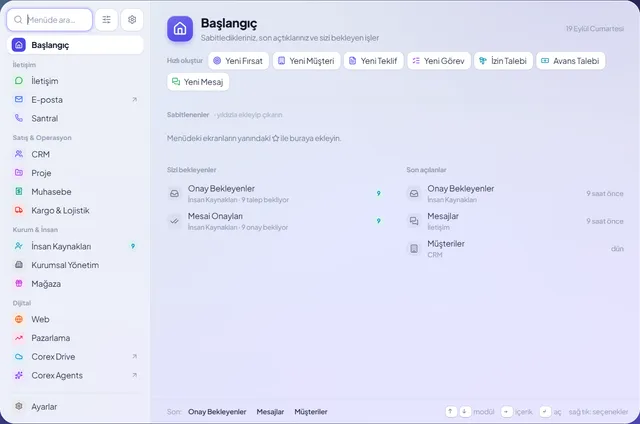
In Corex360 a leave request is opened inside the product, lands on the pending approvals screen of the HR module, and the approval is logged.
Under the PDKS heading, the HR module has screens for clock-in and clock-out, shift management, overtime tracking, attendance tracking, timesheets and the leave calendar. Request flows cover leave, advance, travel allowance and payment requests. In the approval center, attendance events such as a late clock-in or a clock-out away from the location also come up for approval, with the employee's explanation and department on the record. Leave balance calculation is not promised.
Sources
How was this page prepared?
- Written by: Şevket Erer, Co-founder, AI Specialist
- Sources: legislation, official body, and vendor information is taken from the primary sources in the Sources list on this page; each source shows the date it was last checked.
- Product information: sentences about Corex360 rest on the company's product fact records; unconfirmed features are not written.
- Use of AI: the Corex360 team writes the text; AI tools are used for drafting and translation. Publishing principles
- Dates: first published , last updated . Corrections policy
Frequently asked
01What is leave tracking software?
Leave tracking software is where leave requests are entered, approved, posted to the calendar and payroll, and where the remaining entitlement is tracked. It moves leave off paper and messages and onto one record.
02How is annual leave entitlement calculated?
The minimum paid annual leave is set in Turkish labour law according to the employee's length of service and age; an employment or collective agreement can provide more. Settle the calculation rule with your accountant or HR adviser before setup.
03How is half-day or hourly leave tracked?
When the unit of leave is defined in hours rather than days, short absences are recorded too. If short leave sits on the same calendar as the clock-in record, an early departure does not look like an absence.
04Who approves when the manager is on leave?
The approval chain should name a backup approver; otherwise requests wait until the manager returns and the calendar fills late. The backup's decision should also be recorded with who made it and when.
05Should employees see their own remaining leave?
Yes. An employee who sees their remaining balance plans requests around it and does not ask HR the same question again and again. At year end any argument about the balance rests on the record.
06Who sees the sick note attached to a leave record?
In Corex360 access is role-based: only people whose role allows it see personal data such as a sick note. Which role sees what is configured, every open and download is logged, and the data is processed under KVKK (Turkey's personal data protection law).
Leave, advance, and overtime requests land in the approval centre; the manager approves or rejects them, and the record keeps who approved and when.
Related articles
Keep reading.

Time and attendance records clock-in and clock-out times and feeds leave, overtime, and payroll. That data falls under KVKK (Turkish data law).
DateRead the article01HRHow to make a performance review fair: let the score come from the work
In a fair performance review the score comes from the record and the rule is known in advance. Rules written down early keep the review meeting calm.
DateRead the article02HRHow to choose a time and attendance system: look at the record before the device
Choosing time and attendance: card, PIN, or phone comes after the month-end desk. KVKK (Turkish data law) and how your workplace runs decide the rest.
DateRead the article03HRLeave tracking: paper forms or a digital flow
A paper leave form works for a team in one building with one approver. Once the team spreads out, it is time to move leave to a digital flow.
DateRead the article04HRWhat is a personnel file, and how do you keep one digitally
A personnel file is the record an employer keeps for each employee. The documents it holds, health data, access rights, and rules for keeping it digitally.
DateRead the article05HRHow to calculate overtime: hours, pay, and time off in lieu
Overtime is calculated by finding the hours above the weekly limit and paying them at the higher rate or as time off. Thresholds, rates, consent, limits.
DateRead the article06HR & AttendanceAttendance problems: late arrivals, missing records, and leave clashes
Most attendance problems come from clock-in records kept apart from tasks and leave. The root causes of late arrivals, missing records, and leave clashes.
DateRead the article07Customer trackingHow to track customers: what belongs on the card
Customer tracking means the conversation and next step sit on the customer card. If customers leave with the salesperson, tracking lived in one person.
DateRead the article08